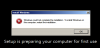
I downloaded the iso straight from MSDN (and verified the hashes matched). When I put in the product key, the installation failed saying the product key was invalid. I unchecked the "product key required" checkbox that Parallels gives you for new VMs. The installation proceeded, but failed during the startup sequence with the following error:
"Windows could not complete the installation. To install Windows on this computer, restart the installation."
It reboots, then fails with the same error (see attachment). I deleted that iso, and downloaded again. Same results. I tried again with the 2008 R2 SP1 iso. Same results.
Parallels support was absolutely useless. They told me it was the file that was the problem and kept saying to redownload. When I told the "engineer" to transfer me to level 2, he said they would just say the same thing. :-(
I am running Parallels 8 for Mac: 8.0.18354.
Retina MBP
OS X 10.8
I accepted the default config for the VM.
Does anyone have any ideas. I'd be tempted to shoot myself before calling support again. If anyone from Parallels is reading this, please do something as you have a *very* unhappy corporate customer. My ticket number is 1588696.
Any thoughts would be helpful. Thank you.
"Windows could not complete the installation. To install Windows on this computer, restart the installation."
It reboots, then fails with the same error (see attachment). I deleted that iso, and downloaded again. Same results. I tried again with the 2008 R2 SP1 iso. Same results.
Parallels support was absolutely useless. They told me it was the file that was the problem and kept saying to redownload. When I told the "engineer" to transfer me to level 2, he said they would just say the same thing. :-(
I am running Parallels 8 for Mac: 8.0.18354.
Retina MBP
OS X 10.8
I accepted the default config for the VM.
Does anyone have any ideas. I'd be tempted to shoot myself before calling support again. If anyone from Parallels is reading this, please do something as you have a *very* unhappy corporate customer. My ticket number is 1588696.
Any thoughts would be helpful. Thank you.