Flip 3D

pjcraddock

Bit poster
Kudos on a great release! Parallels keeps getting better all the time!
Quick easy question I didn't see in the docs... What is the keystroke for Flip 3D in Windows 7?
 
The short answer is: Alt+1+Tab.

Flip3D is normally activated by Win+Tab on PC keyboard. By default Parallels maps Cmd to Win key, so Cmd+Tab would have worked, but it's also OS X task switching shortcut. So there's an additional mapping: Alt+1 to Win key which helps in this case.
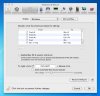
You can control keyboard mappings from Parallels Preferences / Keyboard & Mouse.
 
So when I'm in a Win VM, i could care less about the Mac task switching shortcut, and would like to map Cmd+Tab to act as Win+Tab, but can't figure out how to do so. Any pointers?
 
iduff,

Parallels Desktop menu -> Preferences -> Keyboard & Mouse -> uncheck Enable OS X System Shortcuts.
 
Remap Win+Tab?

I'd like to remap the funky Alt+1+Tab (very inconvenient when the focus is on a Win7 Parallels 5 VM) to Cmd+Tab, but seemingly am denied the ability to do so.

Unchecking the "Enable Mac OS X system shortcuts" neither enables Cmd+Tab, nor allows me to map that key combo.

Any thoughts or guidance on how to get rid of Alt+1+Tab and map Cmd+Tab to Win+Tab?
 

Attachments

  • Screen shot 2009-11-15 at 11.02.33.JPG
    Screen shot 2009-11-15 at 11.02.33.JPG
    109.1 KB · Views: 8
Last edited:
iduff,

Oops... non-working Cmd+Tab -> Win+Tab mapping needs to be fixed on our side. We're sorry for inconvenience.
 
Cool, at least now I can stop beating myself up for not being able to figure it out! I look forward to your fix!
 
Not only has this been fixed in Window and in Full Screen modes, it even work in Coherence mode!?! WTF? Yep, Parallels engineers rock!
 
Back
Top