Ghost Taskbar in Windows 8 Retina

briordan

Bit poster
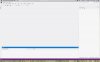
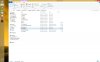
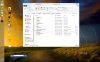
Hello. In order for my Windows 8 Apps to properly run full screen (maximized), I have to enable autohide of the windows taskbar. Otherwise, apps still allocate space for the hidden taskbar in windows. I can not get a maximized application to fill the space of the hidden windows 8 taskbar. I have tried the taskbar in different locations such as right or left as well as locked and unlocked. See attached screenshots. Is anyone else experiencing this? If this is already reported I apologize for my forum search skills but I couldn't find anything on it.

Windows 8 Enterprise Preview
Parallels Desktop 8

Thanks,

~ Ben

Edit: Also re-installed parallels tools.
 

Attachments

  • Screen Shot 2012-09-23 at 3.56.01 PM.jpg
    Screen Shot 2012-09-23 at 3.56.01 PM.jpg
    52.7 KB · Views: 6
  • Screen Shot 2012-09-23 at 3.56.40 PM.jpg
    Screen Shot 2012-09-23 at 3.56.40 PM.jpg
    55.5 KB · Views: 6
Last edited:
I think I have a similar problem.

I am running Windows 8 Pro inside of Parallels 8 for Mac. My system is a 15 inch retina display.

I prefer to have my taskbar on the left side of the screen. Everything looks normal until you look at desktop icons that lie close to the status bar, and when maximizing an application to full screen.

There is an area to the right of the taskbar that is equal in width where no icon will display. Pictures describe it better than I can.

I have uninstalled and reinstalled parallels tools, in fact I believe it is being caused by parallels tools since the problem is nonexistent in the first few seconds of starting up (Before paralels tools has loaded)

Has anyone seen this behavior?

Screen Shot 2013-06-24 at 10.34.58 PM.jpgScreen Shot 2013-06-24 at 10.34.53 PM.jpg
 
Back
Top