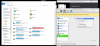
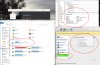
Someone just gave me an old Sony 2X MPF88E floppy drive. El Capitan doesn't recognize this drive anymore and there are no Windows drivers since Win2000/ME. Thing is, it worked beautifully this afternoon, I got all my files off one floppy just fine. But, I haven't been able to get it recognized by Parallels or Windows ever since.
I have a DVD drive that's working fine with the configurations I tweaked, but not the floppy. If it hadn't worked so great for an hour I would just give up, but dang it, I know it works.
So, I've deselected USB 3.0 and verified sharing is Home only. The way the DVD works is the Mac recognizes it first and when I run Windows it disappears from the MAC desktop and shows up in Windows. But, again, from Googling, El Capitan is not going to recognize the floppy no matter what I do.
At a couple of points in all my random trying things, I would get the nice graphic dialog asking if I wanted to open the device in Mac or Windows and if I want to save the selection. I don't get that anymore, even though I've gone into configuration and selected that option. I even went in deselected, went out and reselected it. Nuh-unh.
So, any help would be greatly appreciated. I'd love to get my files from a quarter century ago. The ones I got today were perfect!
I have a DVD drive that's working fine with the configurations I tweaked, but not the floppy. If it hadn't worked so great for an hour I would just give up, but dang it, I know it works.
So, I've deselected USB 3.0 and verified sharing is Home only. The way the DVD works is the Mac recognizes it first and when I run Windows it disappears from the MAC desktop and shows up in Windows. But, again, from Googling, El Capitan is not going to recognize the floppy no matter what I do.
At a couple of points in all my random trying things, I would get the nice graphic dialog asking if I wanted to open the device in Mac or Windows and if I want to save the selection. I don't get that anymore, even though I've gone into configuration and selected that option. I even went in deselected, went out and reselected it. Nuh-unh.
So, any help would be greatly appreciated. I'd love to get my files from a quarter century ago. The ones I got today were perfect!