
Guys, I need real help here.
I am using Parallels Desktop for Mac to Boot Windows XP.
It worked for months.
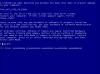
But today, it suddenly crashed into the Blue Screen of Death error and I can't figure a way out of this!
Error Code :
irql_not_less_or_equal 0x0000000a
Infos
1. I have tried to boot under 3 types of safe mode - Doesn't work (it goes to BSOD as well)
2. I have tried to boot under Normal Mode and Last Known Working Config … - Doesn't Work (Goes BSOD)
3. I have tried to set my processor number to 1 (from 4) and lowered my RAM as far as 512MB (from 1GB) - Still doesn't work
4. I can't clean my motherboard or whatever (it's a laptop :S)
So if I can't boot Windows, how can I possibly solve this?
Please help anyone. I would really appreciate it.
Thanks.
PS : I've read many other forums, they say it's most likely a driver problem… But how do I verify that without being able to boot ? ._.
I am using Parallels Desktop for Mac to Boot Windows XP.
It worked for months.
But today, it suddenly crashed into the Blue Screen of Death error and I can't figure a way out of this!
Error Code :
irql_not_less_or_equal 0x0000000a
Infos
1. I have tried to boot under 3 types of safe mode - Doesn't work (it goes to BSOD as well)
2. I have tried to boot under Normal Mode and Last Known Working Config … - Doesn't Work (Goes BSOD)
3. I have tried to set my processor number to 1 (from 4) and lowered my RAM as far as 512MB (from 1GB) - Still doesn't work
4. I can't clean my motherboard or whatever (it's a laptop :S)
So if I can't boot Windows, how can I possibly solve this?
Please help anyone. I would really appreciate it.
Thanks.
PS : I've read many other forums, they say it's most likely a driver problem… But how do I verify that without being able to boot ? ._.
