Adam_Peters
Bit poster
Dear Forum Readers,
Can anybody help with this question, have been looking through few forums but could see no posts about this topic..
Updated to Version 10 across weekend after using previous V.8 & V.9.
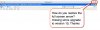
My full screen toggle button (normally located top right corner of window) is missing - how do I get it back??
Are there any settings which enable or disable this specific feature?
Went through all options that i could see in the configuration settings however this is eluding me..
See picture attached
Appreciate any help provided
Thanks everyone
Can anybody help with this question, have been looking through few forums but could see no posts about this topic..
Updated to Version 10 across weekend after using previous V.8 & V.9.
My full screen toggle button (normally located top right corner of window) is missing - how do I get it back??
Are there any settings which enable or disable this specific feature?
Went through all options that i could see in the configuration settings however this is eluding me..
See picture attached
Appreciate any help provided
Thanks everyone