Have a new Mac, running Leopard, and I installed the 5160 build of parallels. I had to use an installation workaround I found in these forums to get XP installed properly, but it is working now. Network, devices, etc., all okay.
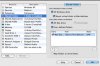
My problem is that I have no shared folders. I've checked all the boxes in the Shared Folder preferences screen and I would expect to see a Windows file folder somewhere in the Mac Finder on the Mac and a Mac folder of files somewhere within the Windows Explorer, but they are not there. I've tried different combinations of check box options within Preferences, restarting, etc., but to no avail.
I can transfer files successfully when I start up Parallels Explorer, but that makes every operation a multistep process. BTW, I get an error when I start Parallels Explorer if Virtual Machine is running and vice versa. Seems to only work one application at a time which may be normal behavior for all I know.
Suggestions?
Thanks,
Tom
My problem is that I have no shared folders. I've checked all the boxes in the Shared Folder preferences screen and I would expect to see a Windows file folder somewhere in the Mac Finder on the Mac and a Mac folder of files somewhere within the Windows Explorer, but they are not there. I've tried different combinations of check box options within Preferences, restarting, etc., but to no avail.
I can transfer files successfully when I start up Parallels Explorer, but that makes every operation a multistep process. BTW, I get an error when I start Parallels Explorer if Virtual Machine is running and vice versa. Seems to only work one application at a time which may be normal behavior for all I know.
Suggestions?
Thanks,
Tom