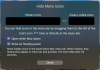
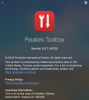
After reading the recent blog post on the Hide Menubar Icons feature in Parallels Toolbox, I tried it out. It seems that (at least on my configuration) it's not working: here's the look of the settings panel (there are NO visible icons to drag to the left to begin with). Nothing in the instruction video in the blog post points to a possible solution. Anyone has any suggestions to fix this?

Note: I'm running the latest Parallels Desktop and Parallels Toolbox on the latest update of macOS Monterey, on a 16"Macbook Pro with an M1Max processor (64 GB universal memory).
Note: I'm running the latest Parallels Desktop and Parallels Toolbox on the latest update of macOS Monterey, on a 16"Macbook Pro with an M1Max processor (64 GB universal memory).