I was on 5160 build and encountered the copy/paste issue. Then I found out from this forum that 5584 fixed the issue. Tried it but encountered high CPU usage for Parallels after the upgrade. It stayed at 100% most of the time, sometimes it dropped to 80+ and then jumped back up. I checked the processes running on XP, and it seems like some standard Windows processes are fighting for CPU times. It was strange to see that taskmgr.exe would jump to 100% sometimes.
Specs of my MacBook Pro laptop:
OS: Mac OS X version 10.4.11
Processor: 2.4 GHz Intel Core 2 Duo
Memory: 2 GB 667 MHz DDR2 SDRAM
Here are the steps I did to upgrade from 5160 - 5584:
1. Downloaded the 5584 file
2. Ran the upgrade without uninstalling 5160
3. Upgrade completed successfully
4. Rebooted my machine
5. Ran Parallels, noticing that the startup process is unusually slow, CPU mounts up to 100%
6. Automatically installed Parallels Tools slowly
7. Rebooted Windows XP, but still see the CPU issue
I tried a clean install too, by first uninstalling 5160, and then reinstalling 5584 using the same XP image. Still saw the CPU problem. I was only using the following USB ports:
IR Receiver
Apple Internal Keyboard/Trackpad
Apple - Wireless
Built-in iSight
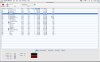
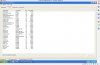
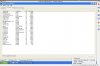
Attached are the screenshots of Activity Monitor and Task Manager.
Thanks,
Ernest
Specs of my MacBook Pro laptop:
OS: Mac OS X version 10.4.11
Processor: 2.4 GHz Intel Core 2 Duo
Memory: 2 GB 667 MHz DDR2 SDRAM
Here are the steps I did to upgrade from 5160 - 5584:
1. Downloaded the 5584 file
2. Ran the upgrade without uninstalling 5160
3. Upgrade completed successfully
4. Rebooted my machine
5. Ran Parallels, noticing that the startup process is unusually slow, CPU mounts up to 100%
6. Automatically installed Parallels Tools slowly
7. Rebooted Windows XP, but still see the CPU issue
I tried a clean install too, by first uninstalling 5160, and then reinstalling 5584 using the same XP image. Still saw the CPU problem. I was only using the following USB ports:
IR Receiver
Apple Internal Keyboard/Trackpad
Apple - Wireless
Built-in iSight
Attached are the screenshots of Activity Monitor and Task Manager.
Thanks,
Ernest