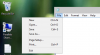
Parallels is virtualizing what appears to be touch support, but my Mac doesn't have a touch screen. The manifestation is that you see checkboxes on files & folders in Windows Explorer, as well as drop-down menus popping out with the wrong orientation (anchored in the upper right instead of the upper left).
I suspect there's probably a driver that could be disabled in Device Manager, but I'm not sure which one it is. Anybody know how to make the touch emulation go away?
(I should mention, I'm using Parallels Desktop 8.)
I suspect there's probably a driver that could be disabled in Device Manager, but I'm not sure which one it is. Anybody know how to make the touch emulation go away?
(I should mention, I'm using Parallels Desktop 8.)