
I have an application that uses OpenGL. It was working in Parallels 10. After upgrading to Parallels 11, the graphics stopped working. In Parallels 11, I have the options to Disable 3D Acceleration, DirectX9 or DirectX10. There is no option to use acceleration with OpenGL. Is there a way to configure acceleration using OpenGL?
If I disable 3D Acceleration, the image displays but it redraws too slow to be usable. If I select DirectX9 or 10, the image will not display.
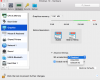
If I disable 3D Acceleration, the image displays but it redraws too slow to be usable. If I select DirectX9 or 10, the image will not display.