My HDD is now bloated to over 26GB, even though I only have about 4GB of files. I'd like to compact it. However, running Parallels Compressor does not work. After it runs its tasks in windows then does a reboot, it gets an error message that says it failed.
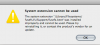
I'm thinking it might be related to an error message that I always get when I run Parallels. Screen shot attached. It says "The system extension libary/file systems/fusefs.fs/Support/fusefs.kext" was installed improperly and cannot be used."
I read a thread somewhere about creating a second HDD, then shifting everything over to that HDD, but can't remember if that is a viable solution.
Thanks in advance for any help.
I'm thinking it might be related to an error message that I always get when I run Parallels. Screen shot attached. It says "The system extension libary/file systems/fusefs.fs/Support/fusefs.kext" was installed improperly and cannot be used."
I read a thread somewhere about creating a second HDD, then shifting everything over to that HDD, but can't remember if that is a viable solution.
Thanks in advance for any help.