How to delete a Parallels 11 option...

StarShot

Member
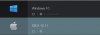
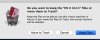
Yesterday I mistakenly clicked on an option in the Parallels setup and now I seem to have another boot option, this time to OS X. See photo 1. If I try to delete this option, I get the second message saying it will remove my OS X files. If I did "remove" these OS X files, would it trash everything in the OS X side? See phono 2
 

Attachments

  • Par1.jpg
    Par1.jpg
    17.9 KB · Views: 6
  • Par2.jpg
    Par2.jpg
    29.4 KB · Views: 5
If you delete a VM (choosing 'Move to trash' in your second picture), it just moves the Parallels Virtual Machine file to the trash, it does not delete any other operating system files on your computer. You can right click on this VM, and choose Show in Finder. These Parallels PVM files are most likely in your Documents folder, in a folder named Parallels. In this folder you will see at least two files: one for your Windows 10 VM, and another for the OS X 10.11 VM you accidentally created. Once you delete the OS X VM, you will see this file has been moved to your trash, and you should empty the trash to reclaim the disk space it was consuming.
This article also helps: http://kb.parallels.com/en/5029
 
Back
Top