Hi,
I'm using Windows 8.1 with Parallels 13 on MacBook Pro 2017 (15-inch).
Previously I used same Windows 8.1 VM with Parallels 10 on MacBook Pro 2014 (15-inch).
Parallels 10 seems not to have scaling smoothing feature, so that appearances in Windows is jaggy when on retina display, on the other hand, appearances in Windows on external (not HiDPI) display is dot-by-dot which brings very clear view as if the display is connected to native Windows laptop PC.
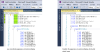
However, when I updated Parallels from 10 to 13 because of macOS version, display smoothing feature is forcely enabled, which brings less-jaggy appearances in retina display and over-smoothed appearances in external display.
I want to disable display smoothing feature, is it possible?
I'm using Windows 8.1 with Parallels 13 on MacBook Pro 2017 (15-inch).
Previously I used same Windows 8.1 VM with Parallels 10 on MacBook Pro 2014 (15-inch).
Parallels 10 seems not to have scaling smoothing feature, so that appearances in Windows is jaggy when on retina display, on the other hand, appearances in Windows on external (not HiDPI) display is dot-by-dot which brings very clear view as if the display is connected to native Windows laptop PC.
However, when I updated Parallels from 10 to 13 because of macOS version, display smoothing feature is forcely enabled, which brings less-jaggy appearances in retina display and over-smoothed appearances in external display.
I want to disable display smoothing feature, is it possible?