How to disable security about prevention boot loader changer?

RedFoxy Darrest

Bit poster
Hi!
I want install Windows 7 HE 64Bit in a bootcamp partition and I want use that installation with my iMac (using bootcamp) and with Parallels, but when I try to format BC's partition, Parallels give me an error:

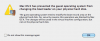
Mac OS X has prevented the guest operating system from changing the boot loader on your physical hard disk.

The guest operating system tried to modify the boot record area on the physical hard disk. For security reasons this operation was blocked by Mac OS X. The changes will be saved in the virtual machine configuration, but not on the physical hard disk.

How can I bypass it?

I can't install windows by superdrive.

Thank's
 

Attachments

  • prevent_boot_loader_mod.png
    prevent_boot_loader_mod.png
    7.6 KB · Views: 52
Hi,

Exact same issue except I am trying to copy over a clone of the drive that I made when I wanted to resize my BC partition. OS X won't let Parallels mess with the boot record of the BC partition but in order to load up windows I need to be able to do that. Would you be so kind as to describe how you went about circumventing this security safegaurd? Though you replied that you fixed this, I wasn't exactly clear on what it is you did.

Thanks so much :)
DC~
 
I solved going on ignoring the alerts, after the procedure I close paralles and using fdisk I've activate my windows partition, after that I've Windows 7 64bit installed
 
how do you guys proceed after that error message? I get another window that has either "Retry" or "Stop". clicking retry will keep displaying the same message, and stop will force the VM to close.

I also used 'fdisk' on mac and set my windows partition as active and still the same error window
 
Last edited:
SOLUTION FOUND

First off, neither I or Parallels are not responsible for any data loss that this may give you if it does not work.

Open Terminal

Type sudo -s

Paste the following into terminal and hit enter:
/Applications/Parallels\ Desktop.app/Contents/MacOS/prl_client_app

Follow the rest of the instructions from other sites that talk about reFIT
 
SOLUTION FOUND

First off, neither I or Parallels are not responsible for any data loss that this may give you if it does not work.

Open Terminal

Type sudo -s

Paste the following into terminal and hit enter:
/Applications/Parallels\ Desktop.app/Contents/MacOS/prl_client_app

Follow the rest of the instructions from other sites that talk about reFIT

running Parallels as 'root' still didn't do the job, the error message still appears while trying to install windows
 
Yes, please does anyone have a solution for this? I really want to be able to actually repair one of my drives using parallels, but can't as things stand :(
 
Me too

I am having a similar issue getting Parallels 8 to work with my functional Boot Camp install. I have no problems booting into Windows 7 using either the Startup Disk preference pane or the option key after restart.
After the initial setup with Parallels, it says "Upgrading My Boot Camp" for a long time stuck at around 20%, and then Parallels tells me "You need to log in to Windows to complete configuring your virtual machine". However, when I press OK I just get a DOS screen saying "Trying to boot from SATA drive 1..."
If I configure Parallels to boot from the Windows 7 DVD and attempt a repair via BOOTREC.EXE, I get a Mac OS error "Mac OS X has prevented the guest operating system from changing the boot loader on your physical hard disk."
 
Back
Top