How to enable Windows Phone 8 emulator in Visual Studio 2012

FYI--I've gotten this to work but like others here have seen graphical issues that made this unusable.

The only way I've gotten it to work is to turn off 3D acceleration but then I've noticed that text, etc. now seem non-retina and grainy. So even though technically this works it doesn't work very well. I'm wondering if VMWare might still be the better solution.

Gerry
 
I get the same issue. Seems to be corrupted video memory, and can be 'fixed' by disabling 3D acceleration.

I create problem report: 21924654
 
Is there any chance this problem will be fixed anytime soon? Running without graphics acceleration is a terrible experience, and I'm not that keen on switching to VMWare.
 
@Parallels the issue is the support (or lack of it) for hyper-v running in the Parallels 8 VM. I realise this is perhaps a bad decision on M$ part but the point of a VM is to replicate exactly a physical device.

The error I get is that Hyper V is not installed but when I try and turn it on via 'Turn windows features off and on' its says an instance of HyperV is already running. I did it once, installed W8 Pro and then Vs2012 got the error so wiped the VM built a new VM from the ISO but exactly the same problem. Its nothing to do with memory its purely a hyper-V in a VM issue. The recommended solution is to use Bootcamp (not ideal)

Gary
 
Hm??
It IS supported, this article is further up mentioned on this thread, but in case you missed it: http://kb.parallels.com/en/115211


Err no the OP stated the changes they had to make to a vmx file to get it working. That was to enable hyperV it was nothing to do with memory.

I have 4gb assigned to my parallels 8 vm and it does not work, simple as. Your KB article mentions the in-ability to create the virtual machine to run the emulator not a problem with hyperV.

Gary
 
Err no the OP stated the changes they had to make to a vmx file to get it working. That was to enable hyperV it was nothing to do with memory.

I have 4gb assigned to my parallels 8 vm and it does not work, simple as. Your KB article mentions the in-ability to create the virtual machine to run the emulator not a problem with hyperV.

Gary

I read your post 3 times, I really and honestly don't understand what you mean, must be a problem with me, I'm sure.
 
I read your post 3 times, I really and honestly don't understand what you mean, must be a problem with me, I'm sure.

OK I now its tricky without all the information. If I go into hyperV manager I get this error:

Screen Shot 2013-04-13 at 14.07.38.png

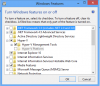
OK So its just a case of installing it then? You go into windows add/remove items and where hyperV is you will see HyperV platform greyed out and you cant install it as it says 'A an instance of HyperV is already running'

Screen Shot 2013-04-13 at 14.06.40.png

Now I am running a SLAT enabled cpu (Intel i7) and I have split my 8GB RAM evenly between OS X and Windows. I cannot get HyperV to work at all and as you know without this the WinMob8 emulator won't run. I have done 2 teardowns and rebuilds from the ISO as I thought I might have done something wrong.

My frustration is that this is absolutely *nothing* to do with the 4GB RAM issue there is something else wrong with the Parallels VM support.

Cheers

Gary
 
I'm not convinced you followed the instructions on the KB I posted. It doesn't only talk about assigning 4 GB, there are other instructions (assigning only on CPU and enabling nested virtualization).
 
Last edited by a moderator:
Hi Parallels Team,

I'd just like to state that I'm seeing something different.
I followed the KB to the letter and what happens is that the emulator attempts to restart then after a few minutes it shuts down.
I'm using the latest Parallels Desktop version running on a 2013 MBA.

I've rebooted the VM and it seems to have fixed the issue. But I'll continue observing.
 
Back
Top