
Ive created a second virtual machine in order to upgrade from Windows XP to Windows 8 (and still be able to use the programs on windows xp meanwhile)
I want to install the 64bit version of Windows 8, but my existing VM says it only has 1GB of RAM - though the mac its running on has 12GB.
Is this something to do with the original Parallels set up or will I have the option to increase this when installing windows 8?
Im running the latest version of Parallels.
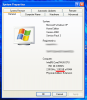
I want to install the 64bit version of Windows 8, but my existing VM says it only has 1GB of RAM - though the mac its running on has 12GB.
Is this something to do with the original Parallels set up or will I have the option to increase this when installing windows 8?
Im running the latest version of Parallels.
