
howaldoliver
Bit poster
Hello everybody,
I'm using Windows 11 VM on a MacBook (macOS 26.5.1) on a Swiss German keyboard layout.
I would like to be able to enter the @-Symbol inside my VM just as I'm able to it on the host OS.
On a Mac keyboard with Swiss German layout you can type the @ by pressing Alt + G while macOS does not distinguish between left and right Alt key.
On Windows with Swisscom German layout, you can type the @ by pressing AltGr + 2 where AltGr is the right Alt key specifically.
To the mapping I would need is:
Alt + G --> AltGr + 2
Unfortunately it seems Parallels doesn't let me type AltGr + 2 in the "To Windows" section of the keyboard mapping settings:
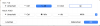
I can select AltGr in the dropdown window, but when I try to add another button, it just overwrites the AltGr. It seems you can only select one button in the dropdown and can only combine it with the four buttons available as UI buttons (shift, option, control, command).
Is there any way to circumvent this?
Thanks in advance for an answer,
Oliver.
I'm using Windows 11 VM on a MacBook (macOS 26.5.1) on a Swiss German keyboard layout.
I would like to be able to enter the @-Symbol inside my VM just as I'm able to it on the host OS.
On a Mac keyboard with Swiss German layout you can type the @ by pressing Alt + G while macOS does not distinguish between left and right Alt key.
On Windows with Swisscom German layout, you can type the @ by pressing AltGr + 2 where AltGr is the right Alt key specifically.
To the mapping I would need is:
Alt + G --> AltGr + 2
Unfortunately it seems Parallels doesn't let me type AltGr + 2 in the "To Windows" section of the keyboard mapping settings:
I can select AltGr in the dropdown window, but when I try to add another button, it just overwrites the AltGr. It seems you can only select one button in the dropdown and can only combine it with the four buttons available as UI buttons (shift, option, control, command).
Is there any way to circumvent this?
Thanks in advance for an answer,
Oliver.

