
Install the app
How to install the app on iOS
Follow along with the video below to see how to install our site as a web app on your home screen.
Note: This feature may not be available in some browsers.
You are using an out of date browser. It may not display this or other websites correctly.
You should upgrade or use an alternative browser.
You should upgrade or use an alternative browser.
How to prevent parallels 12 from pausing when I'm away
- Thread starter HeranQ
- Start date

Hello HeranQ, please check out this article to know how to prevent pausing virtual machine automatically.Hi,
I'm running a CPU intensive program in Mac client when after a while it is paused automatically. I googled but all I got is for Windows. I can't find any option about pause. Is there anyway I can stop it?
Thanks
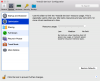
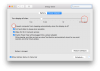
@PaulChris@Parallels That kb article appears to be only for Windows guests. The OP is asking about disabling the auto-pause for MacOS guests. I am also having the same issue. I don't see the "Performance" section or the "Pause MacOS when possible" option in the Optimization tab under Options (see my screenshot). I've tried this when the VM is running AND when the VM is shut down. My VM also has the latest Parallels Tools installed.
Attachments

CristianA2
Bit poster

@PaulChris@Parallels @alexg
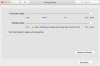
This question still isn't answered for Mac clients, at least not for current versions of macOS. The Energy Savings settings does not have individual options for Plugged in and Battery on a High Sierra Mac client. The only check box option is "Put hard disks to sleep when possible" which I have unchecked.
This question still isn't answered for Mac clients, at least not for current versions of macOS. The Energy Savings settings does not have individual options for Plugged in and Battery on a High Sierra Mac client. The only check box option is "Put hard disks to sleep when possible" which I have unchecked.
Attachments
Hey ScottK11,
ChristianA2 wrote
"In the Parallels 11 Configure menu, Options tab. Uncheck "Pause Windows when possible"
he's right, its there on Sierra, but on your screenshot, you are in the mac OS energy saver preferences - not the Parallels control panel. At the top of your screen with windows running click actions then configure. That's the menu you need.
In my case, under the options tab the "pause windows when possible" option was inside the "startup and Shutdown" section.
ChristianA2 wrote
"In the Parallels 11 Configure menu, Options tab. Uncheck "Pause Windows when possible"
he's right, its there on Sierra, but on your screenshot, you are in the mac OS energy saver preferences - not the Parallels control panel. At the top of your screen with windows running click actions then configure. That's the menu you need.
In my case, under the options tab the "pause windows when possible" option was inside the "startup and Shutdown" section.
Ken Cunningham
Member
Thanks, everyone. For me, opening up the "System Preferences" -> "Energy Savings" inside the guest macOS, and setting the guest macOS system to sleep "Never", indeed stops the VM from pausing during long compiles, etc. I also disabled "Display Sleep" and unchecked "Put hard disks to sleep..." as I presume that Parallels and the host machine would like to take care of those issues.
I don't know at present what happens when the host computer wants to sleep but the guest OS is set to "Sleep Never" -- but this machine I am using it on never sleeps anyway, so that's not an issue I have to worry about.
I don't know at present what happens when the host computer wants to sleep but the guest OS is set to "Sleep Never" -- but this machine I am using it on never sleeps anyway, so that's not an issue I have to worry about.