Before I installed Sonoma on my or client's Macs, I tested it in Parallels. I don't need that VM now and want to delete it, but right click on the macOS14 pane in the Control Panel does not provide a Remove option, only Resume, Configure and Show in Finder. How can I remove the vm?

Install the app
How to install the app on iOS
Follow along with the video below to see how to install our site as a web app on your home screen.
Note: This feature may not be available in some browsers.
You are using an out of date browser. It may not display this or other websites correctly.
You should upgrade or use an alternative browser.
You should upgrade or use an alternative browser.
How to remove a Sonoma virtual machine?
- Thread starter ChazMacs
- Start date
Open Control Center, right click on the VM you want to remove and select "Remove <VM name>" or just delete the PVM. The right click I was referring to was removing Parallels.. It would probably save you a lot of time if you just deleted the PVM or if you'd like to use it to test other machines, just right click and select either Archive or Prepare for Moving. Once that process completes, you can save it with Time Machine or other back up program and then delete the PVM archive. Deleting the PVM doesn't create a problem unless you change your mind after it's deleted.
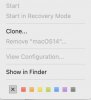
(as an aside, 100% of the VMs I create are for mass installs on client Macs and are Windows 11which might explain some of my confusion. Now I'm going to have to install the Mac 14 Developer Beta just to see the steps required to remove it). Sorry for all the machinations i can see you're running 14 from the jpeg, but let's go all the way back to basics. What machine do you have Parallels installed on? What VM's do you have installed in Parallels? What version of MacOS are you running on the host machine, What version of Parallels? I have deleted (or moved) .PVM files often and generally, once the machine is rebooted, nothing shows up on the Control center. Just an aside, did you delete the .PVM to the trash and then empty the trash? Even though you may have deleted a file, if it's in the trash, Mac seems to have an uncanny knack of finding those files. If there is nothing in the trash and nothing in the Parallels folder under Users/<username>/Parallels nothing should show up in Control center. As an experiment, I've just archived a Win11 VM and am now going to move the .PVMz file to my NAS so it's completely off my machine. I got the prompt to remove the file. Let me experiment with loading MacOS 14 and I'll get back to you. This is a completely interesting conundrum.
Okay, I created a MacOS 14 Sonoma VM and when I click on it, I get the option to "Remove MacOS ...". I'm running the latest version of Parallels. That may be the difference. My right click menu is somewhat similar but with some subtle differences. My right click menu shows "Configure" not "View Configuration".