
Install the app
How to install the app on iOS
Follow along with the video below to see how to install our site as a web app on your home screen.
Note: This feature may not be available in some browsers.
You are using an out of date browser. It may not display this or other websites correctly.
You should upgrade or use an alternative browser.
You should upgrade or use an alternative browser.
I can't find "Show Hard Disk Contents..."
- Thread starter SaehoonD
- Start date
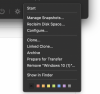
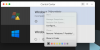
I can't find the "Show hard disk contents" menu either. I need to copy files from my old Windows 7 vm. I am right-clicking on the old vm, but still only get the "Show in Finder" menu.
View attachment 18140
I couldn't get the "Show hard disk contents" option, I'm using the latest Parallels 17 version, but I was able to mount the old windows disks manually using Finder. Just follow these instructions:
https://kb.parallels.com/en/118738
- Use Finder, go to your Parallels VM
- Show Package Contents.
- right click on the HDD image
- select "Open with" > "parallels mounter"