
Install the app
How to install the app on iOS
Follow along with the video below to see how to install our site as a web app on your home screen.
Note: This feature may not be available in some browsers.
You are using an out of date browser. It may not display this or other websites correctly.
You should upgrade or use an alternative browser.
You should upgrade or use an alternative browser.
I can't reactivate parallels for Mac
- Thread starter baiqian
- Start date
-
- Tags
- reactivate
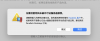
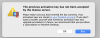
I had send the screen shot.Hello baiqian, please let us know the error message you are getting while activating the license key on the new Mac. Thanks.
DebasmitaM
Forum Maven
Hello, we have sent you a private message. Kindly help us with both our license keys over there.I had send the screen shot.
DebasmitaM
Forum Maven
Hello, we appreciate your response.To activate Parallels Desktop, you need to connect your Mac to the Internet.
- Once you have signed in to your Parallels account, Parallels Desktop will prompt you to activate the application.
- To activate Parallels Desktop with a full license, you only need a license key for the version you are installing.
- To activate Parallels Desktop with an upgrade license, you need two keys: the upgrade key for the version you are installing, and a key for one of previous versions.
- Note: An upgrade license key cannot be used for activation after using a trial version, to extend an expired subscription or if there is no license key from a previous version available. In such cases, please visit the Parallels Online Store to purchase a full license for Parallels Desktop for Mac.
- Enter your license for the current version. If you are activating an upgrade copy, enter your key for one the previous versions. Click Activate.
Greeting,
Rachel Gomez