I chose "install later" and now I'm lost!

dERn

Bit poster
I'm not very good at these things. Parallels would not install the disk image of Mojave that I had, so I chose to "install later", when I guess I was supposed to install from backup partition and then install Mojave once that booted up.
Now Parallels shows me a "MacOS" terminal screen and I don't know what to do! I tried uninstalling Parallels to start over, but it remembered I have this virtual machine in progress when I re-installed.
Somebody please help me!
 
I'm not very good at these things. Parallels would not install the disk image of Mojave that I had, so I chose to "install later", when I guess I was supposed to install from backup partition and then install Mojave once that booted up.
Now Parallels shows me a "MacOS" terminal screen and I don't know what to do! I tried uninstalling Parallels to start over, but it remembered I have this virtual machine in progress when I re-installed.
Somebody please help me!
Hello, could you share a screenshots of the issue please?
 
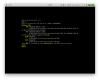
When I open the Parallels app, I get this and I don't know what I'm supposed to do next:
Screen Shot 2021-02-05 at 8.10.28 AM.png
My goal is to run OSX Mojave so that I can use 32-bit apps. I have a Mojave installer dmg and a bootable external drive with Catalina. I don't know if Parallels would allow me to roll back or what my best course of action is from here...

Thanks in advance for your help!
 
Did you get a solution/response? I am trying to do something similar (Sierra for 32bit apps).

I am further than you (I was able to create a Sierra machine), but I cannot get Parallels to recognize external drive (for migration from Time Machine).
 
Back
Top