I get a message error code 21 when i try to install adobe app

yakumoi

Bit poster
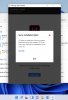
So this is the content of the message that is displayed:
Os does not meet the minimum system requierements for this installer. (0) is the minimum required for installation. (Error code :21)
I have mac M1 os Big Sur 11.6, 8 g0, Windows 11 updated, Parallels Desktop 17 ( trial version)
What can i do? I succeded in installing adobe creative cloud though.
 
Someone told me that it was maybe a problem caused by graphic driver. Is parallels graphic enough for adobe software? Is it possible to insall other graphic driver that are suited for windows possible?
 
So this is the content of the message that is displayed:
Os does not meet the minimum system requierements for this installer. (0) is the minimum required for installation. (Error code :21)
I have mac M1 os Big Sur 11.6, 8 g0, Windows 11 updated, Parallels Desktop 17 ( trial version)
What can i do for my pakistani rugs app? I succeded in installing adobe creative cloud though.

I finally gave up trouble shooting, Uninstalled the CC app and then reinstalled it. After reinstalling the CC app the Lightroom app then installed and is now working.
 
I' m sorry but are you a member of parallels staff ? I thought i'd get a reply from them about the technical report i have sent.
I 'm not sure if i understand your reply fully . If you proposed to reinstall adobe creative cloud app, i already done that and it didn't work unfortunately. I got the same error message.
 
Back
Top