I just bought Parallels Desktop 3.0 for Mac, and it doesn't work.

shadowmark

Bit poster
I got to the window after the installation assistant window with an ISO image or with the CD that came with the package and when it opened, it said boot from hard drive.....failed, boot from CD/DVD-ROM drive....failed, and boot from floppy drive...
non-system disk or disk error.
How do I fix this?
 
is ISO bootable image?
try to test VM creation on some Linux distributive, for example you can try to download Ubuntu and check is installation is strating
 
Those messages appear because you're trying to start a Virtual Machine installation without a bootable CD or bootable ISO image of a Operating System.
 
I'm having the same problem. I checked to make sure the XP disc was bootable and it was. Basically every time I get to the point where it is supposed to install, I get the following:

640 KB Base Memory
524288 KB Extended Memory
Boot from hard drive... failed
Boot from CD/DVD-ROM drive... _


Then it just sits there and does nothing. I've tried ejecting the disc and inserting it again to hopefully get it going, but nothing happens. No keys seem to work. Any other ideas?

Thanks!
Nick
 
Try to create ISO image and use steps to install from CD
to create ISO
1. Insert CD/DVD source

2. Fire up a Terminal, you can then determine the device that is you CD/DVD drive using the following command:

$ drutil status
Vendor Product Rev
MATSHITA DVD-R UJ-835E GAND

Type: DVD-ROM Name: /dev/disk1
Cur Write: 8x DVD Sessions: 1
Max Write: 8x DVD Tracks: 1
Overwritable: 00:00:00 blocks: 0 / 0.00MB / 0.00MiB
Space Free: 00:00:00 blocks: 0 / 0.00MB / 0.00MiB
Space Used: 364:08:27 blocks: 1638627 / 3.36GB / 3.13GiB
Writability:
Book Type: DVD-ROM

3. Umount the disk with the following command:

$ diskutil unmountDisk /dev/disk1
Disk /dev/disk1 unmounted

4. Create the ISO file with the dd utility (may take some time):

$ dd if=/dev/disk1 of=file.iso bs=2048

5. Test the ISO image by mounting the new file (or open with Finder):

$ hdid file.iso

To setup from iso use custom install as described in Parallels Desktop for Mac user guide from http://www.parallels.com/en/download...User_Guide.pdf on page 67 and specify iso image on step 11
 
Try to create ISO image and use steps to install from CD
to create ISO
1. Insert CD/DVD source

2. Fire up a Terminal, you can then determine the device that is you CD/DVD drive using the following command:

$ drutil status
Vendor Product Rev
MATSHITA DVD-R UJ-835E GAND

Type: DVD-ROM Name: /dev/disk1
Cur Write: 8x DVD Sessions: 1
Max Write: 8x DVD Tracks: 1
Overwritable: 00:00:00 blocks: 0 / 0.00MB / 0.00MiB
Space Free: 00:00:00 blocks: 0 / 0.00MB / 0.00MiB
Space Used: 364:08:27 blocks: 1638627 / 3.36GB / 3.13GiB
Writability:
Book Type: DVD-ROM

3. Umount the disk with the following command:

$ diskutil unmountDisk /dev/disk1
Disk /dev/disk1 unmounted

4. Create the ISO file with the dd utility (may take some time):

$ dd if=/dev/disk1 of=file.iso bs=2048

5. Test the ISO image by mounting the new file (or open with Finder):

$ hdid file.iso

To setup from iso use custom install as described in Parallels Desktop for Mac user guide from http://www.parallels.com/en/download...User_Guide.pdf on page 67 and specify iso image on step 11
 
Thanks for the help John. When I attempted step #4, creating the ISO file, I got this:

dd: /dev/disk1: Input/output error
167516+0 records in
167516+0 records out
343072768 bytes transferred in 569.466832 secs (602446 bytes/sec)

And when I tried the next step of testing it, I got this:

hdid: attach failed - no mountable file systems


Any thoughts?

Thanks!
Nick
 
I'm having the same install issues

John,

I am having the same issue with the install. I have read your earlier comments and don't think my XP disk is corrupted as I used it successfully when I installed it in the iBook that I have just replaced.

Any ideas?
 
Hi John,

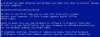
I got the company to send me a replacement XP disc, and I got a little further but stuck again. This time, it goes through where it says "Setup is loading XXXXX" and it goes through a whole series of things, then it says "Windows is starting up", and then I get an error (see attached screenshot).

I tried creating an .iso as per your instructions above, and I was successful in creating it, but when I try to install using it, I just get:

Boot from hard drive... failed
Boot from CD/DVD-ROM drive... failed
Boot from floppy drive... failed
Non-System disk or disk error
Replace and press any key when ready

It never gets any further.

What next?
 

Attachments

  • Picture-1.jpg
    Picture-1.jpg
    35.5 KB · Views: 7
Simple way to test, try to create new VM
Or restart Mac when Windows CD is in and hold option key, you should see Windows CD selection on screen
 
I tested the Windows CD and it appeared just fine after rebooting with Option held down. I'm really needing to get XP installed in Parallels. What else can I do?
 
I finally got it to work. I had to create a .dmg file of the Windows XP disc. After that it was a piece of cake. I strongly suggest that anyone else experiencing this problem try the process found here: http://kb.parallels.com/en/4664 instead of the above in Terminal. I tried it a few times with Terminal and it was never successful. Using Disk Utility was much easier and worked on the first try.
 
Back
Top