
Install the app
How to install the app on iOS
Follow along with the video below to see how to install our site as a web app on your home screen.
Note: This feature may not be available in some browsers.
You are using an out of date browser. It may not display this or other websites correctly.
You should upgrade or use an alternative browser.
You should upgrade or use an alternative browser.
Important updates needed - buttons don't work
- Thread starter RebecaF
- Start date

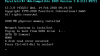
I've been stuck on the blue screen with the "Important updates needed" for about four hours now....it does mention the file is 6GB and could take several hours to download, but I've got a pretty fast internet connection (300 Mbps) and it sure seems like it's not doing anything...guess I'll give it many more hours and see.
RebecaF were you able to move past the Updates needed screen? I also am having the same issue- my blue screen turned orange but I am still not able to do anything in Windows. Down in the Mac application bar I sometimes get bouncing application icons as if they need attention but the updates message is full screen, so I am not able to do anything but right click the application icon and quit. I thought it may have been due to internet speeds that the system was just taking a LONG time to download but it has been 4 DAYS.