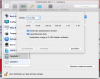
B bolshi Bit poster Jan 6, 2017 #1 Hi, I am running Parallels 11 for Mac Bussiness Edition. I shut down my Ubuntu VM. Under configuration -> Hardware -> Hard disk -> configure I set memory size of 20GB to 40GB. After rebooting my Ubuntu VM is still 20GB. What went wrong?
Hi, I am running Parallels 11 for Mac Bussiness Edition. I shut down my Ubuntu VM. Under configuration -> Hardware -> Hard disk -> configure I set memory size of 20GB to 40GB. After rebooting my Ubuntu VM is still 20GB. What went wrong?
B bolshi Bit poster Jan 6, 2017 #2 I am running OS X Sierra ( 10.12.2 ) Attachments Bildschirmfoto 2017-01-06 um 09.49.01.png 51.4 KB · Views: 6 Bildschirmfoto 2017-01-06 um 09.47.41.png 121.6 KB · Views: 6
Maria@Parallels Problem solver Jan 8, 2017 #3 Hi, did you get any error message during the disk increasing?
B bolshi Bit poster Jan 12, 2017 #4 Hi, didn't get any error message. I shut down the VM, increase the HDD memory, save it and restarted the VM. Unfortunately the same size :/
Hi, didn't get any error message. I shut down the VM, increase the HDD memory, save it and restarted the VM. Unfortunately the same size :/