Input Method Switching Issue in VDI Templates created via RASPrep

CannyC

Bit poster
Problem Description: The input method switching functionality is not working as expected across different user accounts within the VDI. Specifically:
  • Initial Account: The account used during the VDI Template creation process via RASPrep can switch input methods normally.
  • Other Accounts: When any other user logs into the VDI created from this template, they are restricted to English input only. The system fails to switch to other installed input methods.
Steps Taken: The issue consistently occurs on all VDIs deployed from the template processed by RASPrep. It appears that the input method configurations are not being correctly propagated to new user profiles.
 
Hello CannyC,

This is not really a RASPrep issue, it's a Windows default profile problem
What's happening (from my point of view) :
- Input methods were configured in the template account HKCU
- They were not copied to the Default User profile
- New users inherit a clean profile and fall back to English only
Try to configure all required languages in the template :
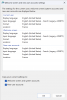
Go to Control Panel -> Region -> Administrative -> Copy settings
Enable Welcome screen and system accounts and New user accounts
Then re-run RASPrep
Root cause is always the same : languages configured per-user instead of in the default profile
 

Attachments

  • Screenshot 2026-03-25 at 07.51.30.png
    Screenshot 2026-03-25 at 07.51.30.png
    103.8 KB · Views: 0
Back
Top