I upgraded Mac OS 10.5 to 10.6 (Snow Leopard) and Parallels v3 no longer runs. So I got Parallels v4 but when I try to install it I get the following error...
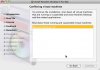
Conflicting virtual machines. To continue the installation, shut down all virtual machines that are running or suspended and close Parallels Desktop and the related applications. Shut down these running and suspended virtual machines: Microsoft Windows XP
...and the Continue button is greyed out. No instance of Parallels is running.
So: as far as I can figure out I have to launch Parallels 3 to shut down the XP VM, but Parallels 3 won't run under Snow Leopard and Parallels 4, which will run under Snow Leopard, won't install until after I've run v3.
Is that about right?
What can I do to solve this?
Conflicting virtual machines. To continue the installation, shut down all virtual machines that are running or suspended and close Parallels Desktop and the related applications. Shut down these running and suspended virtual machines: Microsoft Windows XP
...and the Continue button is greyed out. No instance of Parallels is running.
So: as far as I can figure out I have to launch Parallels 3 to shut down the XP VM, but Parallels 3 won't run under Snow Leopard and Parallels 4, which will run under Snow Leopard, won't install until after I've run v3.
Is that about right?
What can I do to solve this?