
Andy Hutchinson
Junior Member
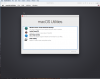
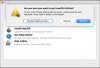
I just installed MacOS Sierra 10.12.6 into Parallels. As soon as Sierra opens I get a MacOS Utility Window opening:Sierra_MacOS Utility Window that has options that I don't need. If I click on the red dot in the top left of the window it gives me three options; Startup Disk, Cancel, Restart. The left and right options will close Sierra and restart Sierra and the MacOS Utility window opens again, etc, etc.
How can I get to the Sierra main screen and use Sierra?
How can I get to the Sierra main screen and use Sierra?