-----Original Message-----
From: Kennedy, Scott C.
Sent: Fri 4/20/2007 5:52 PM
I've heard no response on this issue since I've sent in the request three
days ago, and there's been no helpful solutions in the forum.
Is this a valid problem? Have you seen this on other users with large hard
drives who have a bootcamp partition that is farther than 132 GBs onto the
disk?
Scott
On 4/17/07 12:18 PM, "Scott Kennedy" <XXXX> wrote:
> I've also posted this question in the Forum.
>
>
http://forum.parallels.com/showthread.php?p=55809
>
> Scott
>
>
> On 4/17/07 11:47 AM, "Scott Kennedy" <XXXX> wrote:
>
>> Or could it be that I went from a 160GB hard drive to a 200GB hard drive, and
>> thus both the Windows and Linux partitions that I have are beyond 132GB?
>>
>> My old configuration was...
>> 1) 100GB Mac OS-X
>> 2) 20 GB Linux
>> 3) 40 GB Windows
>>
>> Thus the boot sector for each Parallels OS was the ATA Interface Limit (128
>> GiB / 137 GB) Barrier
>>
>> "To get around past hard disk barriers, most modern hard disks are now no
>> longer addressed using discrete geometry (cylinder, head and sector numbers)
>> but rather logical block addressing and a sector number. However, even if we
>> go away from the problems associated with assigning some bits in an address
>> to
>> cylinder number and others for head number and sector number, we eventually
>> reach the limit of the addressability of all the bits taken together. In the
>> case of the ATA interface, 28 bits are used for the sector number interface
>> between the operating system, BIOS and the hard disk. This means a hard disk
>> can have a maximum of 2^28 or 268,435,456 sectors of 512 bytes. This puts the
>> ATA interface maximum at 128 GiB or approximately 137.4 GB."
>>
>> However, with the new drive I have...
>> Biko:~/Documents/Parallels sck$ diskutil list disk0
>> /dev/disk0
>> #: type name size identifier
>> 0: GUID_partition_scheme *186.3 GB disk0
>> 1: EFI 200.0 MB disk0s1
>> 2: Apple_HFS Biko 131.0 GB disk0s2
>> 3: Microsoft Basic Data UNTITLED 14.5 GB disk0s3
>> 4: Microsoft Basic Data Windows_XP 40.0 GB disk0s4
>>
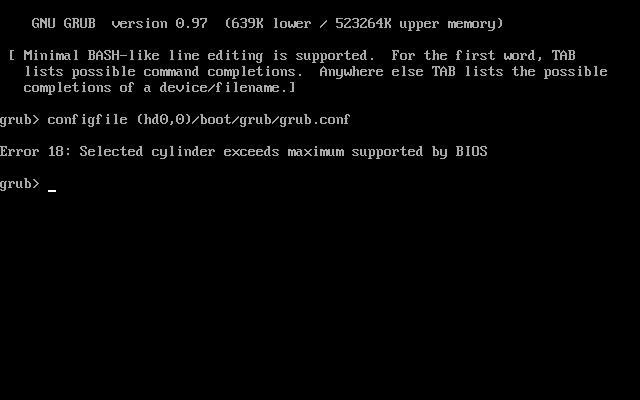
>> The reason for this idea is when I tried to boot the non-support Linux
>> Bootcamp partition I got a "Selected cylinder exceeds maximum supported by
>> BIOS" error from grub.
>>
>> Scott
>>
>> On 4/17/07 11:35 AM, "Scott Kennedy" <XXXXX> wrote:
>>
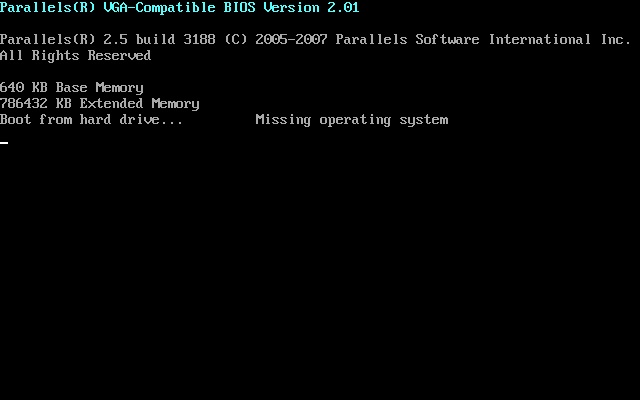
>>> FYI, the error I get is...
>>>
>>> Boot from Hard drive.... Missing Operating System
>>>
>>> Yet, I can boot this partition natively.
>>>
>>> Scott
>>>
>>> On 4/17/07 11:28 AM, "Parallels Desktop Support via RT"
>>> <desktop@parallels.com> wrote:
>>>
>>>> Thank you for contacting Parallels Support!
>>>>
>>>> This message has been automatically generated in response to the creation
>>>> of
>>>> a
>>>> trouble ticket regarding:
>>>> "[Web Support]: Not able to Boot my Bootcamp Windows XP, Scott",
>>>> a summary of which appears at the end of the message.
>>>>
>>>> There is no need to reply to this message right now. Please DO NOT change
>>>> the
>>>> subject line of the email in any future correspondence about this issue.
>>>>
>>>> Our support engineer will contact you within 3 business days. We thank you
>>>> for
>>>> your patience and look forward to answering your question as soon as
>>>> possible!
>>>>
>>>> Sincerely,
>>>> The Parallels Support Team
>>>>
>>>> -------------------------------------------------------------------------
>>>> Person name : Scott
>>>> Company name : XXXX
>>>> Phone : X
>>>> Country : US
>>>> E-Mail : XXXXX
>>>>
>>>> Subject: Not able to Boot my Bootcamp Windows XP
>>>> Type of Mac: MacBook Pro Core 2 Duo
>>>> Guest Operating Systems: Windows XP Professional
>>>> Your Mac total amount of memory: 3GB
>>>> Amount of memory you specify for guest OS: 768MB
>>>> Where did you buy our product?: From an online store
>>>> Build number: 3188
>>>> Please choose the type of your question: Question on using of the Software
>>>> Please describe the problem here: I have a triple boot Bootcamp system,
>>>> which
>>>> WORKED under build 3186, yet after replacing my hard drive I can no longer
>>>> boot my BootCamp windows partition using build 3188.
>>>>
>>>> Here is my disk configuration...
>>>>
>>>> Biko:~ sck$ diskutil list disk0
>>>> /dev/disk0
>>>> #: type name size identifier
>>>> 0: GUID_partition_scheme *186.3 GB disk0
>>>> 1: EFI 200.0 MB disk0s1
>>>> 2: Apple_HFS Biko 131.0 GB disk0s2
>>>> 3: Microsoft Basic Data UNTITLED 14.5 GB disk0s3
>>>> 4: Microsoft Basic Data Windows_XP 40.0 GB disk0s4
>>>>
>>>> And this is my PREVIOUSLY working PVS file for booting off the disk0s4
>>>> partition.
>>>>
>>>> [System]
>>>> Boot = c
>>>> Parallels VM Name = Microsoft Windows XP
>>>> VM Id = {dc69ff7f-bc02-4e94-9610-35bc1336c967}
>>>> VM Description =
>>>> OS Type = 135
>>>> Memory = 768
>>>> Video Memory = 16
>>>> Memory block size = 10
>>>> Acceleration level = 2
>>>> Enable write-back disk cache = 1
>>>> VT-x support = 1
>>>> Start auto = 0
>>>> AutoShutdown = 0
>>>> Start full screen = 21
>>>> Start dashmode = 0
>>>> Start full screen warning = 1
>>>> PC Speaker enable = 1
>>>> Window Mode = 1
>>>> Multi frame = -1
>>>> Guest Tools Status = 2
>>>> [Shared folders]
>>>> Shared folders enabled = 0
>>>> Sharing enabled = 2
>>>> Shared folders count = 0
>>>> [Video]
>>>> Video resolutions enabled = 1
>>>> Video resolutions count = 0
>>>> [Coherence]
>>>> Show taskbar = 0
>>>> Relocate taskbar = 0
>>>> Exclude Dock = 1
>>>> Multiple displays = 0
>>>> [IDE devices]
>>>> Disk 0:0 enabled = 1
>>>> Disk 0:0 = 1
>>>> Disk 0:0 media = 1
>>>> Disk 0:0 connected = 1
>>>> Disk 0:0 image = Boot Camp;disk0s4
>>>> Disk 0:0 cylinders = 65016
>>>> Disk 0:0 heads = 16
>>>> Disk 0:0 sectors = 63
>>>> Disk 0:1 enabled = 1
>>>> Disk 0:1 = 2
>>>> Disk 0:1 media = 0
>>>> Disk 0:1 connected = 1
>>>> Disk 0:1 image = /Library/Parallels/Tools/vmtools.iso
>>>> Disk 1:0 enabled = 0
>>>> Disk 1:0 = 0
>>>> Disk 1:1 enabled = 0
>>>> Disk 1:1 = 0
>>>> [Floppy disks]
>>>> Floppy 0 enabled = 0
>>>> Floppy 0 = 1
>>>> [Serial ports]
>>>> COM1 enabled = 0
>>>> COM1 = 0
>>>> COM2 enabled = 0
>>>> COM3 = 0
>>>> COM4 enabled = 0
>>>> COM4 = 0
>>>> [Parallel ports]
>>>> LPT1 enabled = 0
>>>> LPT1 = 0
>>>> LPT2 enabled = 0
>>>> LPT2 = 0
>>>> LPT3 enabled = 0
>>>> LPT3 = 0
>>>> [Sound]
>>>> Sound enabled = 1
>>>> Sound = 1
>>>> Sound connected = 1
>>>> Sound device = Default Audio
>>>> Mixer device = Default Audio
>>>> [Network]
>>>> Network enabled = 1
>>>> Network = 3
>>>> Network connected = 1
>>>> Adapter No = 0
>>>> Adapter name = Default Adapter
>>>> Adapter type = 4
>>>> Port = 0x00000300
>>>> IRQ = 3
>>>> MAC address = 0064fe883d7c
>>>> Network2 enabled = 0
>>>> Network2 = 0
>>>> Network3 enabled = 0
>>>> Network3 = 0
>>>> Network4 enabled = 0
>>>> Network4 = 0
>>>> Network5 enabled = 0
>>>> Network5 = 0
>>>> [Usb]
>>>> USB enabled = 1
>>>> USB = 1
>>>> USB autoconnect = 0

 Linux
Linux