
Install the app
How to install the app on iOS
Follow along with the video below to see how to install our site as a web app on your home screen.
Note: This feature may not be available in some browsers.
You are using an out of date browser. It may not display this or other websites correctly.
You should upgrade or use an alternative browser.
You should upgrade or use an alternative browser.
Is there any plan to support Linux kernel 6.2?
- Thread starter KojiA
- Start date
Martin Chamberlain
Bit poster
Would you mind providing the link from where you downloaded 23.04?

Pierce
Bit poster
I just encountered a botched upgrade from 22.10 to 23.04 due to parallels tools not supporting the 6.2 kernel, fortunately I was able to boot with the old kernel and uninstall the parallels tools, but now I have a fairly substandard experience.
Is there a timeline of when this will be resolved?
Is there a timeline of when this will be resolved?
Hi. You can only download server version for arm.
https://cdimage.ubuntu.com/releases/23.04/release/
https://cdimage.ubuntu.com/releases/23.04/release/
I encountered the same issue trying to upgrade to Ubuntu 23.04. I was able to come up with a workaround until Parallels comes up with an official solution.
New kernel should now install correctly.
- sudo -i
- cd /var/lib/dkms/parallels-tools/18.2.0.53488/source (assuming you're on that version of parallels)
- grep -r 'MODULE_LICENSE("'
- In each instance where MODULE_LICENSE is defined, change the value from "parallels" to "GPL"
- apt update; apt full-upgrade; apt-autoremove
New kernel should now install correctly.
This worked for me too.
I encountered the same issue trying to upgrade to Ubuntu 23.04. I was able to come up with a workaround until Parallels comes up with an official solution.
- sudo -i
- cd /var/lib/dkms/parallels-tools/18.2.0.53488/source (assuming you're on that version of parallels)
- grep -r 'MODULE_LICENSE("'
- In each instance where MODULE_LICENSE is defined, change the value from "parallels" to "GPL"
- apt update; apt full-upgrade; apt-autoremove
New kernel should now install correctly.

Pavel Merkulov
Parallels Team
Hello,
Thank you for your feedback.
Today, we released the Parallels Desktop 18.3 update.
In this version the issue has been fixed, please update Parallels Desktop to the latest version 18.3
Thank you for your feedback.
Today, we released the Parallels Desktop 18.3 update.
In this version the issue has been fixed, please update Parallels Desktop to the latest version 18.3
Hello,
Thank you for your feedback.
Today, we released the Parallels Desktop 18.3 update.
In this version the issue has been fixed, please update Parallels Desktop to the latest version 18.3
I have updated to the latest version but the latest kernel 6.3 is still not supported

NikolaiS@Parallels
Staff member
@StefanoP4 , thanks!
To let us better understand the situation, please elaborate a little:
1. What distribution and linux kernel are you running?
2. What is the actual behavior: are you experiencing issues running the virtual machine altogether, or are there any issues associated with installing/running Parallels Tools?
Thanks!
To let us better understand the situation, please elaborate a little:
1. What distribution and linux kernel are you running?
2. What is the actual behavior: are you experiencing issues running the virtual machine altogether, or are there any issues associated with installing/running Parallels Tools?
Thanks!
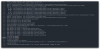
I'm running Kali Linux 2023 fully up-to-date, and after the recent Parallels Desktop update, it keeps failing to update the Parallels Tools.
from parallels-tools.log:
View attachment 20846
any suggests?
That's weird. Google suggests semoule_package is a RHEL/CentOS package. 'apt-file list semodule_package' reveals nothing in Kali. Tools works just fine for me on Kali. I'm working off of a Kali 2023.2a install with kernel 6.3.0.