
Hi Team,
I'm trying the business edition.
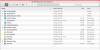
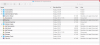
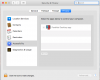
I have intall a genuine copy of W 8.1 and on the Windows folder located on the Dock, when I try to open any application, I get the following error: "There is no application set to open the document "Control Panel ".". I can open it when I'm coherence or non coherence. Also I have added Parallels Desktop App on Accessibility under Security and Privacy on System Preferences.
I have also tried to open by default that "Document" with Parallels Link.app but it doesn't apply the changes on the folders.
I have perform a clean installation of OS X El Capitan with and the unique application I have install your trial version.
Any clue??


I'm trying the business edition.
I have intall a genuine copy of W 8.1 and on the Windows folder located on the Dock, when I try to open any application, I get the following error: "There is no application set to open the document "Control Panel ".". I can open it when I'm coherence or non coherence. Also I have added Parallels Desktop App on Accessibility under Security and Privacy on System Preferences.
I have also tried to open by default that "Document" with Parallels Link.app but it doesn't apply the changes on the folders.
I have perform a clean installation of OS X El Capitan with and the unique application I have install your trial version.
Any clue??