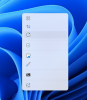
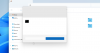
I am running Sonoma with parallels 19 and I am having issues with context menus , start menu etc. Menu's pop up but text is missing. if you know where things are supposed to be then you can click, but you cannot see the usual text. any ideas?

Install the app
How to install the app on iOS
Follow along with the video below to see how to install our site as a web app on your home screen.
Note: This feature may not be available in some browsers.
You are using an out of date browser. It may not display this or other websites correctly.
You should upgrade or use an alternative browser.
You should upgrade or use an alternative browser.
Issues with Windows 11 on Sonoma
- Thread starter FitzJ
- Start date

Hello,
For us to further investigate this issue, kindly reproduce the issue and collect a technical report (right-click Parallels icon in Dock > Help > Send technical data > check "Attach screenshots..." > press Send Report) and provide us with the report's 9-digit ID in reply to this post.
Thank you.
For us to further investigate this issue, kindly reproduce the issue and collect a technical report (right-click Parallels icon in Dock > Help > Send technical data > check "Attach screenshots..." > press Send Report) and provide us with the report's 9-digit ID in reply to this post.
Thank you.