Kapersky Internet Security

Berni69

Bit poster
Hi,
this is my first tile on this forum, i hope i am at the right place ...
I installed Parallels 8 on my iMac. I saw it's possible to get Kaspersky Security in the menu.
I started installation, and finally changed my mind.
Now, at each start on my iMac, on the two sessions, it open's an icon on the top bar that shows the K.

How can i get that out, definitely please ?
I don't find any application, even with spotlight.

Thanks for helping

Best regards
 
You are most likely in coherence mode that would be why you see the K on the top menu bar.
uninstall Kaspersky Security from windows
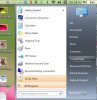
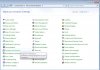
From the Windows start menu select Control Panel >Programs and Features>then select the program you wish to uninstall
 

Attachments

  • screen-capture-17.jpg
    screen-capture-17.jpg
    61.7 KB · Views: 1
  • screen-capture-16.jpg
    screen-capture-16.jpg
    97.7 KB · Views: 1
Hi,
Tanks for answering !
Kapersky has been installed on the Mac OS, not under windows.
Th K appears when i start m'y Mac, not parallels.
 
Hi Bernie,

Are you in Coherence mode?
While in Coherence programs that are installed in your vm will appear on the mac os side.
Did you check in your vm for Kapersky?
 
Hi Kat
in fact when i installed Kapersky Internet Security, i started the VM, but no application inside the VM.
The VM proposed to install an antivirus. What i did.
When i am in the Windows apli inside the VM, there is no Kapersky application found.
When i look around on the Mac os, i don't find anything either !!!

I do'nt understand ...

When i start my Mac Os, the "K" appears on the right top bar.
When i am in coherence mode it doesn't change anything .. no more appli founded ..
 
When you click on the K what drop down menu do you get?
You may be able to Quit Kapersky from that menu.
 
Last edited:
That's right. I can quit, but each time i start the iMac, it appears again ...

Kmenu.jpg
 
Hi, sorry ... had much to do..
Still there. The "paramètes" button does not open anything !
Only button "Quitter" (Quit) stops it, but it comes back when i restart the computer ...

;-(
 
Back
Top