Latest Windows 10 Build (10240) -> No Internet

JeremyJ1

Bit poster
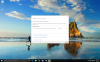
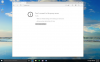
Following installing the latest update to Windows 10 (build 10240) I am no longer able to get an internet connection.
 

Attachments

  • Untitled.png
    Untitled.png
    84 KB · Views: 6
  • Screen Shot 2015-07-17 at 12.00.10 PM.png
    Screen Shot 2015-07-17 at 12.00.10 PM.png
    696.7 KB · Views: 5
  • Screen Shot 2015-07-17 at 11.59.52 AM.png
    Screen Shot 2015-07-17 at 11.59.52 AM.png
    321.3 KB · Views: 8
Hello JeremyJ1,
Please follow the instructions suggested in the knowledge base article to fix network issue in Windows 10 insider preview.

Paul Chris,

Thanks for the info, however it did not work. I have mac firewall disabled (no antivirus), and only the built-in Windows 10 antivirus/firewall default settings. I've tried disabling them as well just to see, but nothing different.

One note: I CAN ping. I've tried pinging parallels.com, google.com and yahoo.com and all received responses. No connection can be established with any other application, however (see images attached to my original message)
 
@JeremyJ1, please try disabling the Sophos and check the issue.
In case it doesn't help please provide us with the Mac proxy settings:
1. Open the System Preferences -> Network
2. In the Network window please check the "Advanced" tab and choose-> Proxy.
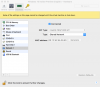
3. Create a screenshot of the Proxy settings and reply us back with this screenshot.
 
Back
Top