Hi
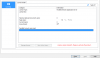
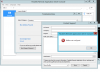
After moving our virtual server with Parallels Remote Application Server Console (v15.5) installed from one datacenter to an new datacenter, we have run into a license problem. We get the following message "License version mismatch. Please re-activate the product". When we try to login to the Parallels web server we get a "The connection was ended because of a network error" message. The server does not have access to internet, so we must use offline activation. I have used the 2XConsole application to generate a "Offline Request" file named 2Xlic.req. Where should I send this file to get a new offline activation file in return (2Xlic.bin). In earlier versions, this was done by sending the file to support@2x.com, but this doesn't work anymore.
Thanks,
Arve
After moving our virtual server with Parallels Remote Application Server Console (v15.5) installed from one datacenter to an new datacenter, we have run into a license problem. We get the following message "License version mismatch. Please re-activate the product". When we try to login to the Parallels web server we get a "The connection was ended because of a network error" message. The server does not have access to internet, so we must use offline activation. I have used the 2XConsole application to generate a "Offline Request" file named 2Xlic.req. Where should I send this file to get a new offline activation file in return (2Xlic.bin). In earlier versions, this was done by sending the file to support@2x.com, but this doesn't work anymore.
Thanks,
Arve