Brett Schmidt
Bit poster
Just wondering if anyone else has experienced this type of problem.
Running Mac OS X (Lion) on a 15" MacBook Pro (2.3GHz i7 with 8GB DDR3 Ram) and updated Parallels Build 7.0.14922on a.
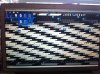
Hope I get my terminology down right ... When I switch "Desktops" / Views (via hitting F3) and I go back to my VM of Windows 7 Ultimate that's installed the screen is ... "garbled" - pixelated - all messed up and stays that way till you start moving the mouse all over the place and clicking randomly. The screen will then start to "re-appear" / become un-garbled so you can actually see the Windows desktop.
This happens with absolutely nothing running in either environment; OS X and nothing running inside Windows 7.
Hoping to add a picture to help better illustrate what exactly the screen is doing.
Any others who have experienced this would be a huge help.
Many thanks
Buckster
Running Mac OS X (Lion) on a 15" MacBook Pro (2.3GHz i7 with 8GB DDR3 Ram) and updated Parallels Build 7.0.14922on a.
Hope I get my terminology down right ... When I switch "Desktops" / Views (via hitting F3) and I go back to my VM of Windows 7 Ultimate that's installed the screen is ... "garbled" - pixelated - all messed up and stays that way till you start moving the mouse all over the place and clicking randomly. The screen will then start to "re-appear" / become un-garbled so you can actually see the Windows desktop.
This happens with absolutely nothing running in either environment; OS X and nothing running inside Windows 7.
Hoping to add a picture to help better illustrate what exactly the screen is doing.
Any others who have experienced this would be a huge help.
Many thanks
Buckster