Loss of DVD drive control

Parallels 12 (latest) and win10. When I use the DVD Superdrive in windows, I lose it on the mac side and I have to close windows to regain control, and sometimes it does not show up in windows either.

How do I fix this?

Thanks
 
Parallels 12 (latest) and win10. When I use the DVD Superdrive in windows, I lose it on the mac side and I have to close windows to regain control, and sometimes it does not show up in windows either.

How do I fix this?

Thanks
We suggest you to refer this article and connect DVD drive with the virtual machine or the Mac.
 
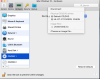
This article confused me, as the instructions are exactly the same for connecting or disconnecting the drive. Either way, they don't match what I see. I am attaching a screenshot of what I see.

I tried the steps but could not succeed as I got a message saying my VM was paused (it wasn't). I may need baby steps.
 

Attachments

  • Screen Shot 2017-04-08 at 9.40.37 AM.png
    Screen Shot 2017-04-08 at 9.40.37 AM.png
    413.7 KB · Views: 3
@RLDumfries If you select the DVD Superdrive to be used in Windows, the drive literally connects to it but not to the Mac. To connect it back to the Mac, refer steps from this article and select the device again at which point you'll actually see a prompt (upper right corner) that the 'Device is now connected to the Mac'. To connect it into Windows, follow the steps suggested in the aforementioned article to connect it into Windows. Please let us know if you have any more questions.
 
Back
Top