Hi, I'm from Japan.
I'm using Google Translate
---
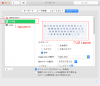
When using mac os in the guest OS, the keyboard is recognized as a US keyboard. I cannot add a new keyboard. Is there a way to select a Japanese keyboard?
Host: Catalina
Guest: Yosemite
However, this is always the case not only this time but when mac os is used as the guest OS.
I'm using Google Translate
---
When using mac os in the guest OS, the keyboard is recognized as a US keyboard. I cannot add a new keyboard. Is there a way to select a Japanese keyboard?
Host: Catalina
Guest: Yosemite
However, this is always the case not only this time but when mac os is used as the guest OS.