Mac OS Mountain Lion networking module error

davidwatts

Bit poster
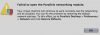
I recenetly upgraded my MBP to the GM of Mac OS Mountain Lion (10.8) and after launching Parallels (Build 7.0.15098) I receive the following error message "Failed to open Parallels networking module." I followed the suggested fix for the error but it doesn't actually fix my problem.

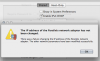
After restoring my default network settings theres another error message The IP address of Parallels network adapter has not been changed. Ive attached two screenshots of the full error Im receiving. I uninstalled and reinstalled Parallels same problem.

Thanks!
 

Attachments

  • Screen Shot 2012-07-10 at 4.51.41 PM.png
    Screen Shot 2012-07-10 at 4.51.41 PM.png
    25.2 KB · Views: 19
  • Screen Shot 2012-07-11 at 8.46.06 AM.png
    Screen Shot 2012-07-11 at 8.46.06 AM.png
    52.4 KB · Views: 19
I finally got the networking module to work again!

I deleted the two files
/Library/Parallels/Parallels Service.app/Contents/Kexts/10.6/prl_netbridge.kext and
/Library/Parallels/Parallels Service.app/Contents/Kexts/10.6/prl_vnic.kext

then reinstalled latest Parallels Desktop 7, started the VM and it automatically installed Parallels Tools.
After a reboot of the vm everything just works fine...
 
I finally got the networking module to work again!

I deleted the two files
/Library/Parallels/Parallels Service.app/Contents/Kexts/10.6/prl_netbridge.kext and
/Library/Parallels/Parallels Service.app/Contents/Kexts/10.6/prl_vnic.kext

then reinstalled latest Parallels Desktop 7, started the VM and it automatically installed Parallels Tools.
After a reboot of the vm everything just works fine...


Thanks, this was exactly what I needed to get things working again. :-)
 
Go to spotlight -> terminal -> copy and paste these command.

sudo launchctl stop com.parallels.desktop.launchdaemon
sudo chown -R root:wheel "/Library/Parallels/Parallels Service.app/Contents/Kexts/10.6"
 
Back
Top