
Install the app
How to install the app on iOS
Follow along with the video below to see how to install our site as a web app on your home screen.
Note: This feature may not be available in some browsers.
You are using an out of date browser. It may not display this or other websites correctly.
You should upgrade or use an alternative browser.
You should upgrade or use an alternative browser.
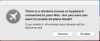
Message at login about airplane mode
- Thread starter OweA
- Start date

sergk
Parallels Developers
Hello, OweA,
please check if "Airplane Mode" tool is added to your Login Items: open System Preference application --> Users & Groups --> Login Items. If Airplane Mode is here then remove it.
Otherwise we need report with technical details: https://kb.parallels.com/en/124107
please check if "Airplane Mode" tool is added to your Login Items: open System Preference application --> Users & Groups --> Login Items. If Airplane Mode is here then remove it.
Otherwise we need report with technical details: https://kb.parallels.com/en/124107

Maria@Parallels
Problem solver
Maria@Parallels
Problem solver
sergk
Parallels Developers
Owe,
we need another technical details reports with extended product logging turned ON:
- quit from Parallels Toolbox
- in Terminal application please run this command
- launch Parallels Toolbox and reproduce the issue (log out and log in again or just restart macOS)
- send another one technical details report and post it's ID here (https://kb.parallels.com/en/124107)
we need another technical details reports with extended product logging turned ON:
- quit from Parallels Toolbox
- in Terminal application please run this command
Code:
defaults write com.parallels.toolbox ExtendedLogging 1- send another one technical details report and post it's ID here (https://kb.parallels.com/en/124107)
Maria@Parallels
Problem solver
sergk
Parallels Developers
Owe,
I think we caught it!
Sometime ago you probably turned "Airplane Mode" ON. After this "Airplane Mode" should be started on every logon. To stop this behaviour the tools had to be stopped manually.
While starting on logon Airplane Mode checks existence of bluetooth devices and asks for confirmation to avoid disconnecting you from keyboard/mouse.
And if you say "No" then tool is not started. But because of the bug "Airplane Mode" doesn't remove itself from autostart in this case. And will be started again on next logon.
You have two ways to fix the issue.
1) Simple, but you must have non-bluetooth mouse or keyboard connected to you Mac mini:
- Just launch Airplane Mode, agree to disable bluetooth devices and then disable Airplane Mode again. After this the tool will not be started on logon
2) If you have only bluetooth mouse and keyboard or the first way haven't helped then write about it here and our support will send you full instruction privately
Anyway, thanks for reporting this bug, we'll fix it in the nearest release.
I think we caught it!
Sometime ago you probably turned "Airplane Mode" ON. After this "Airplane Mode" should be started on every logon. To stop this behaviour the tools had to be stopped manually.
While starting on logon Airplane Mode checks existence of bluetooth devices and asks for confirmation to avoid disconnecting you from keyboard/mouse.
And if you say "No" then tool is not started. But because of the bug "Airplane Mode" doesn't remove itself from autostart in this case. And will be started again on next logon.
You have two ways to fix the issue.
1) Simple, but you must have non-bluetooth mouse or keyboard connected to you Mac mini:
- Just launch Airplane Mode, agree to disable bluetooth devices and then disable Airplane Mode again. After this the tool will not be started on logon
2) If you have only bluetooth mouse and keyboard or the first way haven't helped then write about it here and our support will send you full instruction privately
Anyway, thanks for reporting this bug, we'll fix it in the nearest release.
sergk
Parallels Developers
We are glad to hear that your problem is fixed!It looks like that did the trick - thank you.