Hi Everyone,
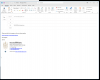
I don't know if anyone had the same problem. When I now click reply or new message on Outlook (Windows version) within a Windows 11 Pro shell, some or all of the original message window is not showing completely.
I know the window is there, because in the Windows taskbar, you can see another window has been created. I have to go down to the bar to trigger the full window before I can type the message.
Maybe I should change a setting somewhere within Parallels to avoid this?
It didn't use to be an issue and I haven't changed any default settings in Parallels or Windows 11.
The computer is an Intel based Macbook Pro 2.4GHz, 8-Core Intel Core i9 with 32 Gb of RAM. I think Windows 11 can only use 8Gb, so that's the default on Parallels allocated to Windows?
Thank you in advance.
I don't know if anyone had the same problem. When I now click reply or new message on Outlook (Windows version) within a Windows 11 Pro shell, some or all of the original message window is not showing completely.
I know the window is there, because in the Windows taskbar, you can see another window has been created. I have to go down to the bar to trigger the full window before I can type the message.
Maybe I should change a setting somewhere within Parallels to avoid this?
It didn't use to be an issue and I haven't changed any default settings in Parallels or Windows 11.
The computer is an Intel based Macbook Pro 2.4GHz, 8-Core Intel Core i9 with 32 Gb of RAM. I think Windows 11 can only use 8Gb, so that's the default on Parallels allocated to Windows?
Thank you in advance.