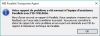
<MigrationReport dyn_lists="">
<OperationInfo dyn_lists="">
  <Type>p2v</Type>
  <Start>2015-10-17 10:18:41</Start>
  <End>2015-10-17 14:28:35</End>
  <Result>135278992</Result>
  <VmUuid></VmUuid>
  <VmName>Windows 10</VmName>
  <DiskName></DiskName>
  <Details>save on error</Details>
</OperationInfo>
<MigrationSettings dyn_lists="">
  <Method>extstor</Method>
  <AutologonChoise>on</AutologonChoise>
  <IntegrationChoise>on</IntegrationChoise>
  <DocsMigrationMode>1</DocsMigrationMode>
  <BrowserSettingsMigrationMode>1</BrowserSettingsMigrationMode>
  <Mode></Mode>
</MigrationSettings>
<MigrationSource dyn_lists="">
  <Os>Microsoft Windows 10 x64 Version 10.0 (Build    10240)</Os>
  <AutologonState>0</AutologonState>
  <UsersCount>0</UsersCount>
  <AdminsCount>0</AdminsCount>
  <EmptyPassCount>0</EmptyPassCount>
  <NeedInstallCd>0</NeedInstallCd>
  <PowerCablePlugged>0</PowerCablePlugged>
  <FirewallEnabled>0</FirewallEnabled>
</MigrationSource>
<SourceHardwareInfo dyn_lists="">
  <HddCount>0</HddCount>
  <DvdCount>0</DvdCount>
</SourceHardwareInfo>
</MigrationReport>
<MigrationReport dyn_lists="">
<OperationInfo dyn_lists="">
  <Type>p2v</Type>
  <Start>2015-10-17 10:18:41</Start>
  <End>2015-10-17 14:29:28</End>
  <Result>134217728</Result>
  <VmUuid></VmUuid>
  <VmName>Windows 10</VmName>
  <DiskName></DiskName>
  <Details>migration was cancelled</Details>
</OperationInfo>
<MigrationSettings dyn_lists="">
  <Method>extstor</Method>
  <AutologonChoise>on</AutologonChoise>
  <IntegrationChoise>on</IntegrationChoise>
  <DocsMigrationMode>1</DocsMigrationMode>
  <BrowserSettingsMigrationMode>1</BrowserSettingsMigrationMode>
  <Mode></Mode>
</MigrationSettings>
<MigrationSource dyn_lists="">
  <Os>Microsoft Windows 10 x64 Version 10.0 (Build    10240)</Os>
  <AutologonState>0</AutologonState>
  <UsersCount>0</UsersCount>
  <AdminsCount>0</AdminsCount>
  <EmptyPassCount>0</EmptyPassCount>
  <NeedInstallCd>0</NeedInstallCd>
  <PowerCablePlugged>0</PowerCablePlugged>
  <FirewallEnabled>0</FirewallEnabled>
</MigrationSource>
<SourceHardwareInfo dyn_lists="">
  <HddCount>0</HddCount>
  <DvdCount>0</DvdCount>
</SourceHardwareInfo>
</MigrationReport>
<MigrationReport dyn_lists="">
<OperationInfo dyn_lists="">
  <Type>p2v</Type>
  <Start>2015-10-17 10:18:41</Start>
  <End>2015-10-17 14:29:28</End>
  <Result>134217728</Result>
  <VmUuid></VmUuid>
  <VmName>Windows 10</VmName>
  <DiskName></DiskName>
  <Details>rsm migration cancelled</Details>
</OperationInfo>
<MigrationSettings dyn_lists="">
  <Method>extstor</Method>
  <AutologonChoise>on</AutologonChoise>
  <IntegrationChoise>on</IntegrationChoise>
  <DocsMigrationMode>1</DocsMigrationMode>
  <BrowserSettingsMigrationMode>1</BrowserSettingsMigrationMode>
  <Mode></Mode>
</MigrationSettings>
<MigrationSource dyn_lists="">
  <Os>Microsoft Windows 10 x64 Version 10.0 (Build    10240)</Os>
  <AutologonState>0</AutologonState>
  <UsersCount>0</UsersCount>
  <AdminsCount>0</AdminsCount>
  <EmptyPassCount>0</EmptyPassCount>
  <NeedInstallCd>0</NeedInstallCd>
  <PowerCablePlugged>0</PowerCablePlugged>
  <FirewallEnabled>0</FirewallEnabled>
</MigrationSource>
<SourceHardwareInfo dyn_lists="">
  <HddCount>0</HddCount>
  <DvdCount>0</DvdCount>
</SourceHardwareInfo>
</MigrationReport>