Minesweeper graphics messed up on PD10 / Yosemite

KeithL

Member
I did a clean install of Yosemite, then a clean install of PD 10. I open a PD 10 VM that was created under Mavericks (whew!) -- and most things appear to be working fine.

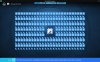
However, when I load Microsoft's Minesweeper program, the graphics in the game are all messed up. The "squares" appear as "triangles", making the game unplayable.

Is anyone else having this problem?

led
 
Can someone who has Windows 8.1 try Minesweeper for me and tell me if their graphics are messed up too? Thanks.
 
I removed / reinstalled Parallels Tools, and the graphics in Minesweeper are still messed up. I've attached a screen shot of what I'm seeing.
 

Attachments

  • Parallels Picture.jpg
    Parallels Picture.jpg
    309.2 KB · Views: 14
Keith,
Minesweeper works fine for me, so the issue must be configuration dependent. With minesweeper on screen, submit a problem report via Parallels Help menu and post report ID here.
 
Well, I don't know what's going on. I broke down today and wiped my old Parallels VM and completely reinstalled Windows 8.1. After that, I loaded Minesweeper and I'm getting the same corrupted graphics that I showed in the screenshot above. Not sure what's going on. This is on a 13" 2013 MacBook Pro Retina. I'm stumped.
 
Minesweeper behaves identically in PD9 and in PD10. The problem is in Intel OpenGL driver for OS X 10.10.
 
Do you know if Apple is working on fixing this bug? Has Parallels informed them of it, or should I? It's not fixed in the latest beta of 10.10.3.
 
Back
Top