Hello...Again.
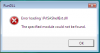
I was adivsed to fresh install because the following Windows Vista Ultimate component (I'm assuming it's from Vista) was missing. It's attached to this message.
I have a MacBook Pro 17" dual-core. 2.33 GHz. OS 10.4.10. I reinstalled last night using the Vista Ultimate CD/DVD 32 bit and did not reboot because I could not find a way to do so. I disposed of Windows.old ASAP as I have no important files. I am still in the testing phase of Parallels. I don't know if it's stable or not.
After I fresh installed, I had problems with the Vista GUI capturing my cursor and not letting it go. Found some way of installing Tools which solved the problem. Now, I get the message that DLL is missing again. What is this software, and why is it going AWOL all the time? What is its significance? How can I put it back to stay?
-Thanks in Advance......Dr. John
I was adivsed to fresh install because the following Windows Vista Ultimate component (I'm assuming it's from Vista) was missing. It's attached to this message.
I have a MacBook Pro 17" dual-core. 2.33 GHz. OS 10.4.10. I reinstalled last night using the Vista Ultimate CD/DVD 32 bit and did not reboot because I could not find a way to do so. I disposed of Windows.old ASAP as I have no important files. I am still in the testing phase of Parallels. I don't know if it's stable or not.
After I fresh installed, I had problems with the Vista GUI capturing my cursor and not letting it go. Found some way of installing Tools which solved the problem. Now, I get the message that DLL is missing again. What is this software, and why is it going AWOL all the time? What is its significance? How can I put it back to stay?
-Thanks in Advance......Dr. John