Hi. I use a regular keyboard for Windows and I like the regular windows experience on mac, switching cmd for ctrl.
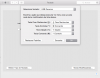
For that, I change I go to Mac Preferences > Keyboard > Modifying Keys (probably this in english) and change ctrl for cmd keys on the desired keyboard.
When I'm using Windows, tho, it causes a reverse situation. When I hit the ctrl key on the windows keyboard on my virtual machine, it opens the Windows' start menu, when the windows key was supposed to do that.
Is there a way to fix that other than switching the Modifying keys back to original settings everytime I run Windows VM?
Thx
For that, I change I go to Mac Preferences > Keyboard > Modifying Keys (probably this in english) and change ctrl for cmd keys on the desired keyboard.
When I'm using Windows, tho, it causes a reverse situation. When I hit the ctrl key on the windows keyboard on my virtual machine, it opens the Windows' start menu, when the windows key was supposed to do that.
Is there a way to fix that other than switching the Modifying keys back to original settings everytime I run Windows VM?
Thx