Install the app
How to install the app on iOS
Follow along with the video below to see how to install our site as a web app on your home screen.
Note: This feature may not be available in some browsers.
You are using an out of date browser. It may not display this or other websites correctly.
You should upgrade or use an alternative browser.
You should upgrade or use an alternative browser.
Move Parallels to new disk
- Thread starter wineman
- Start date

kat
Product Expert
As long as the first hard drive can access the second hard drive (be able to see and use the information stored their). You should be able to copy and paste the vpm, without loss of information.
Parallels needs to know the location of the vpm, so if the second hard drive is mounted properly you should not have an issue.
move it to new hard drive
open Parallels select open (to add existing vpm)
navigate to the location you placed the vpm
select the vpm
I keep a windows 7 vpm on a external hard drive and use it from the external drive with my mac book air.
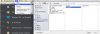
the screen capture shows how I set up my navigation to the vm on my external drive. (It not necessary to set it up that way it was just easier for me., keeps everything a bit neater.)
Parallels needs to know the location of the vpm, so if the second hard drive is mounted properly you should not have an issue.
move it to new hard drive
open Parallels select open (to add existing vpm)
navigate to the location you placed the vpm
select the vpm
I keep a windows 7 vpm on a external hard drive and use it from the external drive with my mac book air.
the screen capture shows how I set up my navigation to the vm on my external drive. (It not necessary to set it up that way it was just easier for me., keeps everything a bit neater.)