
Install the app
How to install the app on iOS
Follow along with the video below to see how to install our site as a web app on your home screen.
Note: This feature may not be available in some browsers.
You are using an out of date browser. It may not display this or other websites correctly.
You should upgrade or use an alternative browser.
You should upgrade or use an alternative browser.
MT4 platform for trading forex
- Thread starter EdwardC4
- Start date
Hi Edward,
I'm using Fusion. Have you tried VirtualBox as well? Here are some of the variants of using MT4 on Mac with parallels - https://www.mql5.com/en/forum/179974 solution.
Cheers
Ian Sweeney
I'm using Fusion. Have you tried VirtualBox as well? Here are some of the variants of using MT4 on Mac with parallels - https://www.mql5.com/en/forum/179974 solution.
Cheers
Ian Sweeney
Last edited:
thanksHi Edward,
I'm using Fusion. Have you tried VirtualBox as well? Here are some of the variants of using MT4 on Mac with parallels - https://www.mql5.com/en/forum/179974 solution.
Cheers
Ian Sweeney
AnastasiiaP
Bit poster
Yes, it is possible to run MT4 on a Mac using Parallels virtualization software. However, the performance may vary depending on the hardware configuration of your Mac and the version of Parallels you are using.
Hello Dmitry, any luck of installing Meta Trader? I`ve got an error message after updating parallels.Hi there,
Yes, it is possible to run MT4 on a Mac using Parallels. Many traders have successfully installed and run the platform on their Macs using this virtualization software.
However, the performance and seamlessness of the setup can vary depending on several factors, such as the Mac's hardware specifications, the version of Parallels being used, and the specific configuration of the virtual machine.
In general, it's best to ensure that your Mac has enough resources to handle running both the virtual machine and the MT4 platform smoothly. You may also want to consider allocating enough memory and CPU resources to the virtual machine to ensure it runs optimally.
Overall, with the right setup, running MT4 on a Mac using Parallels can be a great way to take advantage of the platform's features without having to switch to a Windows machine. Good luck!
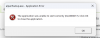
I got the exact same error and I am using a Mac M2 Studio UltraHello Dmitry, any luck of installing Meta Trader? I`ve got an error message after updating parallels. View attachment 21416
CristianJ2
Bit poster
ando exactamente con el mismo error , busque soluciones por todos lados pero parece que dicho problema se presento recientemente por la actualización , alguien tiene alguna solución para dicho problemaHello Dmitry, any luck of installing Meta Trader? I`ve got an error message after updating parallels. View attachment 21416