Hi,
I'm having an issue that prevents the multiple monitor feature from working property for me. I run on three monitors: the MacBook Pro's retina monitor, one 1080p and one 1680x1050 monitor, in that order from left to right. My main monitor is set on the 1080p monitor, but truly, it doesn't matter which one I choose.
When I switch to fullscreen mode in my VM, all three monitors are correctly detected, but they do not appear in the right order. It places my mac monitor on the left, then the 1680x1050 monitor and finally the 1080p one, effectively swapping the two external monitors. This breaks everything from dragging windows across monitors, to mouse click positions. I have attached screenshots of both settings to better highlight the issue.
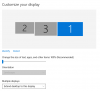
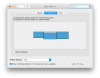
I tried reordering the monitors in Windows settings and in OS X, but then this will break the mouse positioning. I have also tried uninstalling the display driver in Windows and reinstall the Parallels Tools. No matter what I do, they are always detected in that order. I think this started to happen in the last update, but I am not 100% sure.
I am using Parallels 11 business edition with a Windows 10 VM booting from my Boot Camp partition on a MacBook Pro 10,1 with OS X 10.10.5
I'm having an issue that prevents the multiple monitor feature from working property for me. I run on three monitors: the MacBook Pro's retina monitor, one 1080p and one 1680x1050 monitor, in that order from left to right. My main monitor is set on the 1080p monitor, but truly, it doesn't matter which one I choose.
When I switch to fullscreen mode in my VM, all three monitors are correctly detected, but they do not appear in the right order. It places my mac monitor on the left, then the 1680x1050 monitor and finally the 1080p one, effectively swapping the two external monitors. This breaks everything from dragging windows across monitors, to mouse click positions. I have attached screenshots of both settings to better highlight the issue.
I tried reordering the monitors in Windows settings and in OS X, but then this will break the mouse positioning. I have also tried uninstalling the display driver in Windows and reinstall the Parallels Tools. No matter what I do, they are always detected in that order. I think this started to happen in the last update, but I am not 100% sure.
I am using Parallels 11 business edition with a Windows 10 VM booting from my Boot Camp partition on a MacBook Pro 10,1 with OS X 10.10.5